1. Move
Run it once and keep working. Distance keeps accumulating while you use Windows.
Windows tray app | local and privacy-first
MileMouse is a privacy-focused mouse odometer for Windows, tracking daily cursor distance, key counts, and clicks while keeping activity totals on your device.
Windows 10 and 11. The MileMouse desktop app has no cloud sync, no account, and no app telemetry.
The problem
It is hard to understand the physical and input side of a workday without collecting more than needed. MileMouse turns mouse distance, key count, clicks, and active time into personal daily totals without profiling apps, sites, or content.
01
A key press increments a number. MileMouse does not record or save the key, typed text, passwords, or clipboard content.
02
Daily totals are stored in local Windows app data. The MileMouse app sends no customer data or activity profile to Magellan Software LLC.
03
MileMouse has no employer dashboard or remote viewer, and it does not track app names, window titles, or websites.
04
Tracking uses simple counters and local JSON storage with no MileMouse account, telemetry, or cloud sync.
MileMouse stays in your tray, keeps a daily tally, and helps you review your patterns without changing how you work.
Run it once and keep working. Distance keeps accumulating while you use Windows.
Track how many keys and clicks happen in your day, never which keys were pressed.
Review day-by-day totals so your workload trend is visible at a glance.
Mouse distance, made useful
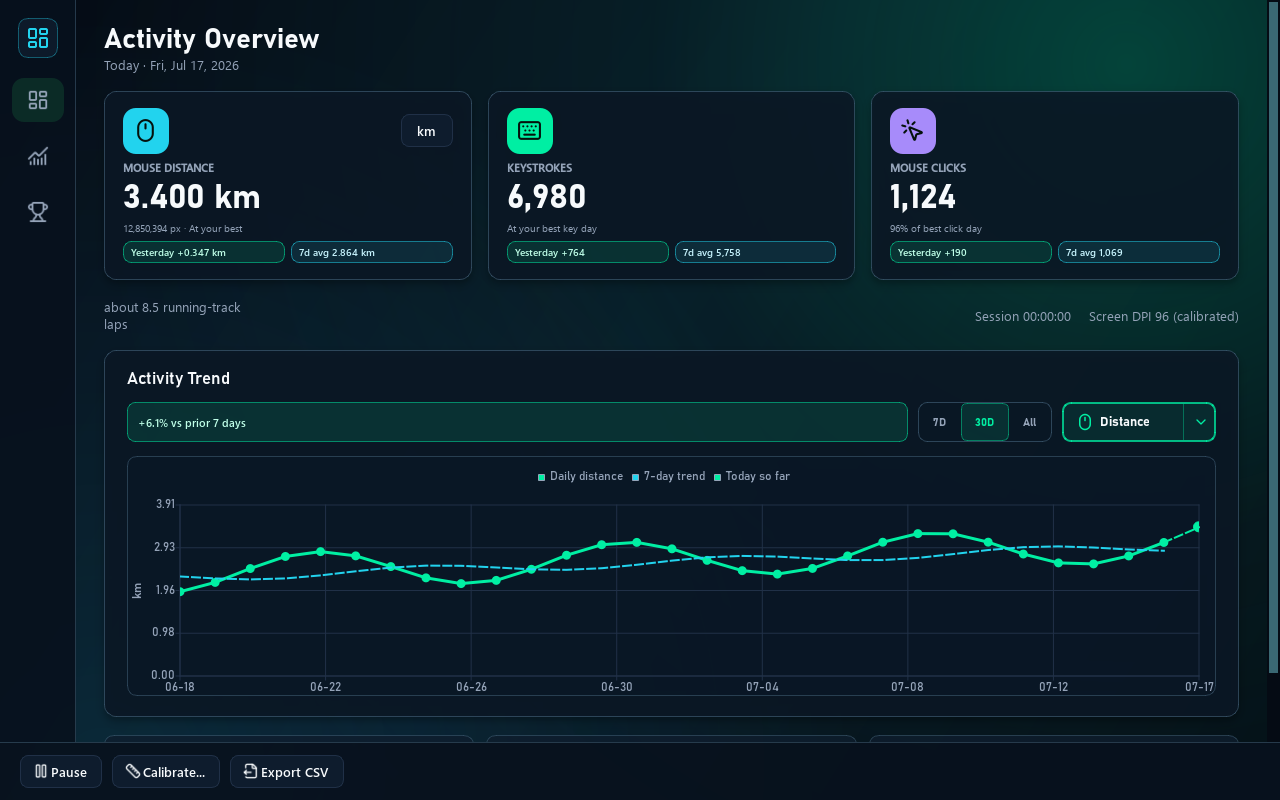
MileMouse turns cursor travel into daily cursor distance and places it beside mouse clicks and keystroke counts. You get a clearer read of each Windows workday, with totals stored on your local PC for private day-to-day review.
Movement between cursor positions is added into readable daily distance. Implausibly large jumps are filtered to keep totals practical, but the result is still an estimate from sampled motion, not a perfect reconstruction of every path.
One daily distance total
Calibration and DPI settings convert pixels into a real-world estimate. After setup, distance can be viewed as meters, kilometers, or miles, and accuracy follows your display configuration across screens and scaling choices.
Meters | kilometers | miles
Use daily totals to compare your own routines and input load across writing, design, and admin tasks. There is no app/window/site profile, and MileMouse is not employee monitoring or a productivity score.
Personal insight, not surveillance
See how cursor distance, mouse clicks, and keystroke counts rise or settle together across writing, design, and everyday admin work.
Measures cursor travel throughout the day so movement intensity is easy to compare. This mouse distance tracker reports movement as readable daily totals instead of raw pixel counts.
Counts activity volume as totals only, with no key content captured or stored. It works as a keystroke counter for aggregate daily volume while never recording key identity or text.
Pro includes deeper records and chart views for long-term analysis.
Fine-tune tracking with calibration and settings to match your workstation setup.
Lives quietly in the system tray so your dashboard is there when you need it.
Free keeps the newest 7 rows, while Pro includes unlimited history plus share, export, and backup tools.
Private by design
MileMouse stores daily totals locally. It does not record or save which keys you press, what you type, passwords, clipboard content, app names, window titles, or websites.
Microsoft Store may separately handle app delivery, purchases, and license checks. MileMouse does not send activity totals through that process.
| Feature | Free | Pro |
|---|---|---|
| Live counting and today stats | Included | Included |
| Daily history window | Newest 7 rows | Unlimited history |
| Calibration and settings | Included | Included |
| Records and charts | Not included | Included |
| Break tools | Not included | Included |
| Share, export, and backup | Not included | Included |
| Unlock model | Free | One-time Microsoft Store purchase |
| Automatic trial | Not applicable | Local 30-day preview after confirmed Store-Free |
Download the permanent Free tier from Microsoft Store. Pro is an optional one-time Store purchase, and eligible Free users receive a local 30-day Pro preview.
Download the Free tier for Windows 10 or 11. Upgrade to Pro inside MileMouse whenever you want unlimited history, deeper insights, Activity Breaks, and export tools.